Should I Upgrade My PC or Buy New?The 2026 Decision Guide

What This Guide Covers
Here's the rule I use: if the upgrades you need cost more than 50–60% of what a comparable new system costs, buy new. You're not upgrading at that point — you're rebuilding on a foundation that's already 5–7 years old. That math only gets worse over time.
The mistake I've seen more than any other is spending $400–$600 on GPU and RAM upgrades for a machine whose CPU will be outdated in two years — then needing a full platform change anyway. A little arithmetic upfront prevents that. The decision isn't complicated, but it does require actually running the numbers rather than buying the part that seems most obviously wrong.
Below is the full framework: when upgrading is clearly the right move, when buying new is, how to apply the cost rule to your specific situation, and what the current 2026 market conditions mean for the math.
1. The One-Question Test
Before anything else, ask yourself: would solving my problem require replacing more than one major component — CPU, GPU, RAM, or motherboard?
If the answer is no — only one component is the issue — just upgrade that part and stop reading. A single SSD swap, a RAM upgrade, a GPU swap with an existing solid platform: these decisions don't need a framework. They just need a compatibility check. See what to upgrade first if you're not sure which component to target.
If the answer is yes — you need two or more major components — then you need to run the cost calculation before buying anything. That's where most people go wrong. They price the GPU, decide it's reasonable, buy it, then discover the CPU is too old to feed it, then discover the motherboard needs replacing to fit a better CPU, then discover they need DDR5 RAM with the new board. What started as a $350 GPU upgrade becomes a $1,100 platform change that's three-quarters of the way to a new PC.
The one-question test gates you into the right conversation before you've spent anything.
2. When Upgrading Your PC Clearly Makes Sense
There are cases where opening the case and swapping a part is indisputably the right move. None of these require much deliberation.
You're still running an HDD as your boot drive.
This is the most common and most impactful upgrade available. A mechanical hard drive running Windows 11 will hit 100% disk utilization just doing routine background tasks — that's the cause of the random freezes, the 3-minute boot times, the "Not Responding" apps. A modern NVMe SSD cuts boot time from 85–90 seconds down to under 10. An entry-level SATA SSD still drops it to under 20. The cost is $50–$100. There is no scenario where this isn't worth doing on a machine you plan to use for another year or more. See the SSD upgrade guide for compatibility details.
Your RAM is consistently above 85% during normal use.
Open Task Manager (Ctrl+Shift+Esc → Performance → Memory) and do your normal tasks for 10 minutes. If you're sitting at 85%+ with just a browser and a few apps open, more RAM is the fix. Going from 8GB to 16GB typically drops that number from around 90–94% down to 50–60%, which is the headroom that makes everything feel responsive again. DDR4 RAM for older platforms remains affordable at around $40–$60 for a 16GB kit. DDR5 for newer platforms is more expensive right now — but if RAM utilization is your actual problem, it's still worth it.
Your GPU is clearly the bottleneck and your platform is still capable.
If games run poorly but your CPU sits comfortably below 80% while gaming, a GPU upgrade is the right call. The test is simple: download MSI Afterburner, enable the in-game overlay, and play a demanding scene for 5+ minutes. GPU at 95–100% while CPU is below 70–75% is a GPU bottleneck, confirmed. Before ordering anything: verify your PSU has enough headroom and your case can physically fit a modern card.
Your CPU has upgrade headroom within its current platform.
This is one of the best value plays available right now. If your motherboard's CPU support list includes a significantly faster processor — like upgrading from an early Ryzen chip to a 5000-series X3D — you get a major performance jump without touching your RAM or board. CPU prices have stayed remarkably stable in 2026. The Ryzen 9800X3D is currently near its $479 MSRP. That's real performance for known money, with no compatibility surprises.
3. When Buying a New PC Makes More Sense
These are the scenarios where upgrading individual parts stops making financial sense.
A CPU upgrade requires a new platform.
If the CPU you need requires a different socket, you also need a new motherboard. And a new motherboard for a modern CPU means DDR5 RAM, because AM5 and LGA1851 are both DDR5-only. That's a CPU + motherboard + RAM bundle — a platform change. In 2026 that total runs $600–$900+ before touching the GPU. At that number, you're most of the way to a complete new build and you're still keeping your old GPU, case, and storage. Run the cost comparison before committing.
Both your CPU and GPU are maxing out.
If both are bottlenecked simultaneously, replacing the GPU alone won't fix the CPU, and replacing the CPU likely triggers a platform change. You're rebuilding the core of the machine. Evaluate a new system seriously at this point, because the cost of getting there piecemeal is usually higher than building fresh.
Your CPU is 7+ years old.
Processors from 2016 and earlier struggle to feed modern GPUs at the speeds they're capable of. Spending $300–$400 on a current mid-range GPU for a machine built around a Core i5-6600 or Ryzen 1600 means the GPU runs at 50–60% of its actual capability. You're not buying $350 of performance — you're buying $200 of performance on a $350 card. That's a bad trade.
Multiple components are failing or degrading.
When an aging machine starts generating random crashes, blue screens from different sources, and fan noise that wasn't there before, you're playing whack-a-mole with hardware failure. Fixing one thing doesn't prevent the next thing from going. A new system resets all of that — fresh warranties on every component, known-good hardware, no residual issues from whatever degraded first.
Worth noting on the buy-new side:
A new system also gives you Windows 11 compatibility on guaranteed-supported hardware, significantly better power efficiency (modern CPUs and GPUs draw noticeably less power for equivalent performance), and a platform that accepts component upgrades for the next 4–5 years.
4. The 50–60% Cost Rule — How to Apply It
This is the rule that actually settles the debate. Add up the cost of every upgrade your machine needs to function the way you want. Then find the price of a comparable new system for your use case. If your upgrade total exceeds 50–60% of the new system cost, buy new.
The reason the threshold isn't higher — say 80% — is that new hardware comes with warranties on every single part, a fresh power budget, and a platform that will remain upgradeable for years. Spending 70% of a new-PC budget to extend a 6-year-old machine by another 2 years, with no warranties and aging components throughout, is a bad deal even if the numbers technically work.
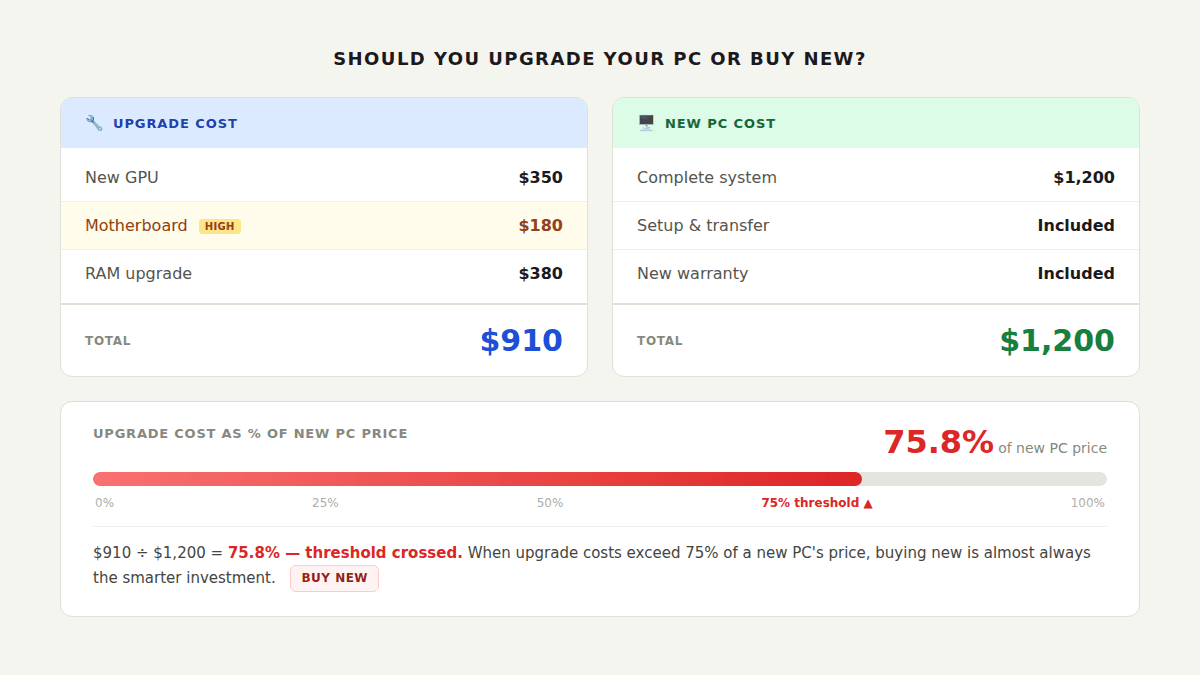
Example A: Upgrade clearly wins
2019 mid-range desktop, Ryzen 5 3600, still on HDD, 8GB DDR4. The machine is slow to boot and tabs freeze under load. Needed upgrades: 1TB NVMe SSD ($75) + 16GB DDR4 kit ($50) = $125 total. A comparable new entry-level desktop runs $600–$700. That's under 20% of the new-PC cost. Upgrade without question.
Example B: The calculation changes the decision
2017 desktop, Core i5-7400, no upgrade path on the existing platform, paired with a failing GTX 1060. Needed upgrades: new CPU (requires new socket) + B650 motherboard ($180) + 32GB DDR5-6000 ($380) + RTX 5060 GPU ($330) = $890+ before anything else. A decent new mid-range build runs $1,100–$1,300. At 70–80% of the new-PC cost, you're past the threshold — and you're doing it on a new board inside an old case with an old PSU you're hoping holds up.
Example C: SSD triage on an old machine
2014 desktop, Core i5-4590, DDR3, integrated graphics. The machine boots in 4 minutes and is barely usable. A single SATA SSD ($60) cuts that to under 30 seconds and makes basic tasks functional again. Nothing else is worth investing in — DDR3 is expensive for a dead platform, and any GPU would be CPU-bottlenecked. One $60 upgrade, 1–2 more usable years while saving for a replacement.
5. Why 2026 Is a Complicated Time for This Decision
The market dynamics right now affect the 50–60% calculation in ways that weren't true 18 months ago, so this is worth understanding before you run the numbers.
DDR5 RAM prices have surged significantly since late 2025, driven by AI datacenter demand absorbing global memory production. A 32GB DDR5-6000 kit that was $80–$120 in mid-2025 now runs $310–$410+. That price alone is enough to push a platform-change calculation over the 60% threshold in many cases — which means upgrades that would have been reasonable a year ago now pencil out differently. If your upgrade requires new DDR5 RAM alongside a new board, factor in that full current cost, not what you remember seeing last year.
CPU prices have stayed stable. The 9800X3D is near its $479 MSRP. Mid-range CPUs in the Ryzen 7000 and Intel Core Ultra series are available at predictable prices. This makes CPU-only upgrades within an existing platform one of the best value plays right now — you get meaningful performance improvement without touching the memory cost.
GPU prices at the mid-range are closer to MSRP than they've been in recent years. The RX 9070 XT and RTX 5070 are available without significant markups at time of writing. If a GPU upgrade is what your system actually needs — and your platform can support it — now is a reasonable time to buy one.
The short version: single-part upgrades (SSD, RAM within existing platform, GPU, same-socket CPU) are good value right now. Full platform changes involving new DDR5 are expensive. If you're on the fence about a platform change, waiting for memory prices to normalize is a legitimate strategy.
6. The Triage Strategy — A Small Upgrade Now, New PC Later
You don't have to choose between upgrading everything and replacing everything. If your machine is dying but your budget for a new PC isn't ready, a single targeted upgrade can extend its life by 1–2 years for under $100.
The triage upgrade that makes the biggest difference is almost always the SSD. A machine that boots in 3–4 minutes and freezes constantly on an HDD becomes genuinely usable after a $70–$100 SSD swap — boot time drops to under 30 seconds, apps open in under 2 seconds, random freezes largely disappear. The rest of the hardware doesn't change, but the experience changes substantially. That's enough to make a machine comfortable while you save for a proper new build.
Topping up from 8GB to 16GB RAM is the other triage upgrade worth considering if your platform is DDR4 and the cost is under $50–$60. Together, SSD + RAM covers the two most common sources of perceived slowness without touching the CPU, board, or power supply.
Where the triage strategy stops making sense: if getting the machine functional again requires a new motherboard or new DDR5 RAM, the cost has already moved past triage territory. You're not extending a machine at that point — you're rebuilding one. Go back to the 50–60% rule and run the real numbers.
Review the full upgrade guide for step-by-step installation instructions on any of these swaps.
7. Quick Decision by Component
For each component type, here's the short version of the calculation:
| Component | Upgrade if... | Skip / Go new if... |
|---|---|---|
| Storage (HDD) | Still on HDD — SSD upgrade is almost always the right call regardless of system age | Already on NVMe; SSD won't improve FPS or multitasking |
| RAM | Under 16GB or Task Manager shows 85%+ during normal use; DDR4 platforms especially affordable | Already at 32GB; or DDR5 platform change required — run cost calc first |
| GPU | GPU confirmed as bottleneck via Afterburner overlay; PSU has headroom; CPU is not also maxing out | CPU is also bottlenecked; platform is 7+ years old and CPU would throttle a new GPU |
| CPU (same platform) | Motherboard support list includes a meaningfully faster chip; no new board or RAM required | No faster compatible CPU exists; or the performance gap is marginal |
| CPU (new platform) | Run the full cost calc: CPU + board + DDR5 RAM. Only proceed if total stays under 50–60% of new system cost | Total cost of platform change exceeds 50–60% of a new build — at that point, just build new |
8. Common Mistakes When Making This Decision
Mistake 1: Pricing only the headline component, not the full stack
The GPU looks like the only purchase needed. But the CPU is too old to feed it, which means a new socket, which means a new board, which means DDR5. I've watched this play out with $350 GPU upgrades that turned into $1,100 projects three weeks later. Price the whole stack before buying anything. If the answer is "I need more than one major component," that's the signal to run the full cost comparison.
Mistake 2: Applying last year's DDR5 prices to today's calculation
People remember DDR5 being affordable in 2024–2025 and assume it still is. The numbers have changed substantially. A 32GB DDR5-6000 kit that was $80–$120 now runs $310–$410+. If your platform-change calculation doesn't use current prices, it will underestimate the total significantly — and a project that seemed like 45% of a new PC's cost will actually be 75%.
Mistake 3: Investing in a platform that has no upgrade path
Spending $300 on a GPU for a system with an LGA1151 or AM3 CPU means buying a card whose performance is permanently capped at what that old processor can feed. There's no future CPU upgrade on those platforms — Intel locked them out, and AMD's AM3 support list ended years ago. If the platform is a dead end, any investment above triage level is wasted.
Mistake 4: Ignoring what "buy new" actually includes
A new PC comes with full warranties on every component, significantly better power efficiency, guaranteed Windows 11 support, and a platform that remains upgrade-capable for 4–5 years. People compare upgrade cost to new-PC cost as if those things are equivalent, but the new system is getting you 4–5 years of warranted, upgradeable hardware. That matters when you're deciding whether 55% of that cost is "close enough."
Frequently Asked Questions
Is it worth upgrading a 5-year-old PC?
Usually yes, if only one or two components are causing the problems. A 5-year-old PC with an HDD and 8GB of RAM can feel genuinely new after a $70 SSD swap and a $50 DDR4 kit — that's $120 total for a machine that works well for another 2+ years. The calculation changes if the CPU is so old it bottlenecks modern GPUs, or if multiple things are failing at once.
How much should I spend on upgrades before buying new makes more sense?
Once your upgrade total exceeds 50–60% of what a comparable new system costs, buy new. At that point you're spending serious money on aging hardware with no warranties. A new system comes with full warranties on every part and a platform that accepts upgrades for the next 4–5 years.
Is it cheaper to upgrade or buy a new PC in 2026?
Single-part upgrades are excellent value right now. Full platform changes — requiring a new CPU, motherboard, and DDR5 RAM — are unusually expensive because AI datacenter demand has pushed DDR5 prices well above historical levels. A 32GB DDR5-6000 kit that cost $80–$120 eighteen months ago now runs $310–$410+. If your upgrade requires a platform change, run current prices through the 50–60% rule before committing.
My PC needs both a new CPU and a new GPU. Should I upgrade or buy new?
If the CPU requires a new platform (new socket = new board = new DDR5 RAM), you're looking at $600–$900+ in platform costs before the GPU. At that total you're three-quarters of the way to a complete new build. Buy new. The only exception: if you can upgrade the CPU within your existing socket — check your board's CPU support list first before assuming a new platform is required.
Can I do a small upgrade now and build a new PC later?
Yes — and this is often the right call. A single SSD upgrade ($70–$100) takes a machine that boots in 3–4 minutes down to under 30 seconds and makes daily use comfortable again. That buys 1–2 years while you save for a proper new build — and while DDR5 prices potentially normalize. The triage strategy stops making sense when getting the machine functional requires a new motherboard or DDR5 RAM, at which point you're past triage cost and into the buy-new threshold.
What to Read Next
- What to Upgrade First on Your PC — if you've decided to upgrade, this maps your symptoms to the right component quickly.
- What Should I Upgrade on My PC? — the full diagnostic walkthrough using Task Manager, CPU-Z, and MSI Afterburner to find your actual bottleneck.
- How to Upgrade an Old PC — covers DDR3/DDR4 platform specifics and exactly what's worth investing in on hardware from 2012–2018.
- PC Upgrade Guide 2026 — current component recommendations with specific product picks across every tier once you've decided to upgrade.
- How to Upgrade Your PC — the physical installation guide once you've ordered parts.