Core Ultra 7 270K Plus vs Ryzen 7 9800X3DOne is 20% faster in games. The other is about $150–160 cheaper and sits on a socket Intel is about to abandon. Here's which one to buy in 2026.
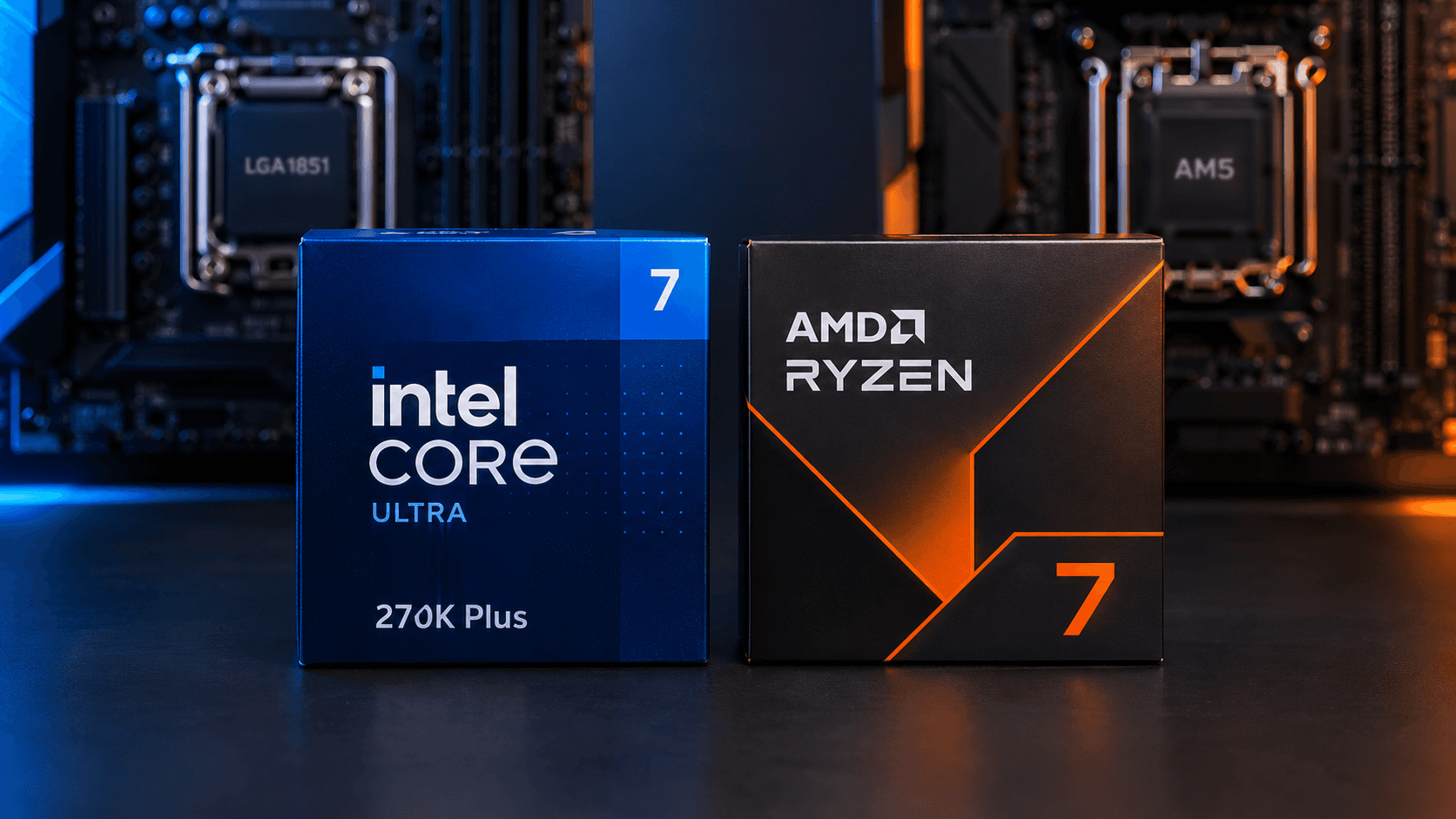
If you mostly game and want the option to drop in a faster chip later, buy the Ryzen 7 9800X3D. It's about 20% faster than the Core Ultra 7 270K Plus in CPU-heavy games, and AMD has confirmed its AM5 socket through 2029. If you also render, compile or edit video and play at 1440p on a mid-range graphics card, the 270K Plus is the smarter buy: it's about $150–160 cheaper as a platform, up to 80% faster in multi-core work, and close enough in games that you won't feel the difference most of the time. The catch is the one most comparisons skip: the 270K Plus is the last good chip its socket will ever get.
This article started life as a 265K vs 9800X3D comparison. Intel replaced the 265K with the 270K Plus in March 2026, on the same socket and in the same price bracket, so I'm comparing the chip Intel actually sells now. The 265K gets its own verdict in section 9 and in the FAQ, so if that's what you searched for, you're in the right place.
One step before you spend $400 on either chip: if you haven't confirmed that your processor is what's limiting your frame rate, run through the CPU upgrade bottleneck checks first. A faster CPU does nothing for a game that's waiting on your graphics card.
What This Guide Covers
1. The 30-Second Verdict
Buy the Ryzen 7 9800X3D if gaming is your main job for this PC and you'd like to drop in a faster CPU in two or three years. It's about 20% faster in CPU-heavy games, and its AM5 socket is confirmed through 2029.
Buy the Core Ultra 7 270K Plus if you game at 1440p on a mid-range card and also render, compile or edit video. You'll barely feel the gaming gap, you get up to 80% more multi-core performance, and you save about $150–160, as long as you accept that your next CPU upgrade means a new motherboard too.
| Ryzen 7 9800X3D | Core Ultra 7 270K Plus | |
|---|---|---|
| Gaming lead | About 20% faster at 1080p with an RTX 5090 (Tom's Hardware) | About 20% behind |
| Multi-core lead | 8 cores, 5,505 in Cinebench 2026 multi | 24 cores, 9,896 (+80%, Club386) |
| Platform cost (CPU + WiFi board + 32GB DDR5-6000) | $1,062 | $903 (about $150–160 less) |
| Upgrade path | AM5, supported through 2029 | LGA1851, a dead end |
The rest of this article is the evidence behind that table. If you only read one more section, make it section 6, because the socket is the part of this decision that benchmarks can't show you.
2. Price Reality Check: What Each Platform Actually Costs
The 9800X3D launched at $479–480 and has been discounted hard. PCPartPicker lists it at $443 as of October 14. In the week of October 6–7, Wccftech tracked it at $411 on Amazon, with a free copy of Onimusha: Way of the Sword, and TechSpot found it at $429 at Newegg with a promo code (listed at $469), so $443 is slightly above those recent lows.
The Core Ultra 7 270K Plus launched at $299 on March 26, 2026, per TweakTown. Since then it has sold for $290 at Newegg with a code (July 28), $255 at Amazon (August 15), and $199.99 at Micro Center, in-store pickup only (August 27), and it bounces back above $300 between deals. PCPartPicker lists it at $293 as of October 14, and it's worth checking Micro Center if you live near one.
A CPU sticker price isn't what you pay, so here's the platform: the CPU, a WiFi motherboard, and 32GB of DDR5-6000. Board prices are Newegg listings from MaxMyBuild's June 2026 roundup: the ASUS Prime B860-Plus WiFi at about $161 for Intel and the MSI B850 Gaming Plus WiFi at about $170 for AMD. The RAM is $449 for 32GB of DDR5-6000, the best current US price on Tom's Hardware's RAM price index as of October 12.
| Platform | CPU | WiFi board | CPU + board | With 32GB DDR5-6000 |
|---|---|---|---|---|
| Core Ultra 7 270K Plus | $293 | $161 | $454 | $903 |
| Ryzen 7 9800X3D | $443 | $170 | $613 | $1,062 |
AMD costs about $150–160 more. Notice how much of the total is the memory: at $449, the RAM is more than either CPU, and it costs the same on both sides because both platforms need DDR5. The shortage makes the CPU savings a smaller slice of the build than they would have been a year ago. If you want the background on why a kit costs this much, our 2026 RAM shortage breakdown covers it.
Cooling narrows the gap slightly. Tom's Hardware says the 270K Plus needs a bigger cooler than the 9800X3D: a dual-tower air cooler ($100–120) or a 360mm AIO ($150–250), while X3D chips are fine on a 240mm AIO ($80–150). If you need a new cooler either way, the Intel build spends a bit more there, so the real gap is slightly smaller than $150–160. If you already own a good cooler, the full gap stands.
One more way to save money: you don't need expensive CUDIMM memory for the 270K Plus. Intel officially supports up to DDR5-7200 CUDIMM, and reviewers love testing with DDR5-8200, but TechSpot measured the cost of dropping to DDR5-6000 at about 3% in Horizon Zero Dawn Remastered, 5% in Marvel Rivals and 1% in Rainbow Six Siege. Buy the regular kit.
3. Gaming Benchmarks: How Big Is the 9800X3D's Lead?
Across a 17-game suite, Tom's Hardware found the 9800X3D about 20% faster than the 270K Plus. Intel itself claimed its chip was only 10–12% behind, which tells you which number to trust. The same review put the 270K Plus about 10% ahead of the 265K it replaced. Test conditions were 1080p, a mix of High and Ultra settings, no upscaling, and an RTX 5090 Founders Edition.
Reviewers test this way for one reason: a top-end graphics card at 1080p removes the GPU as the limit, so you see the CPU difference at its biggest. That makes these numbers the worst case for the 270K Plus, not a typical one. Section 4 deals with what that means for your card.
| Game | Source | Result |
|---|---|---|
| Cyberpunk 2077 | Club386 | 9800X3D 10–12% ahead (195–243 fps vs 177–217 fps) |
| Cyberpunk 2077 | GamersNexus | 9800X3D 208 fps vs 270K Plus 165 fps (+26%) |
| F1 25 | Club386 | 9800X3D 19–21% ahead (116–326 vs 96–275 fps) |
| F1 25 | GamersNexus | 9800X3D +29% |
| Kingdom Come: Deliverance II | GamersNexus | 9800X3D +32% |
| Total War: Warhammer III | Club386 | 9800X3D 25% ahead (average) |
| Dragon's Dogma 2 (High) | GamersNexus | 9800X3D 127 fps vs 111 fps (+14%) |
| Final Fantasy XIV: Dawntrail | Club386 | 9800X3D 9% ahead on average, 35% ahead on minimums |
| Rainbow Six Siege | Club386 | 9800X3D 8–10% ahead (426–480 vs 389–443 fps) |
| The Outer Worlds 2 | GamersNexus | 9800X3D 139 fps vs 133 fps (+4.5%) |
| Civilization VI (turn time) | Club386 | 270K Plus faster: 22.6s vs 23.5s |
All results at 1080p with an RTX 5090. Club386 tested at High settings on March 30, 2026, GamersNexus on the same date. Sources: Club386, GamersNexus.
The spread is the story. In The Outer Worlds 2 and Rainbow Six Siege, the 270K Plus is within 4.5–10% and you'd never pick the winner without a frame counter. In F1 25, Kingdom Come: Deliverance II and Total War, it falls 19–32% behind, and those are exactly the simulation-heavy, many-units-on-screen games where a big cache pays off. The two outlets also disagree on Cyberpunk by a wide margin (10–12% from Club386 against 26% from GamersNexus), so treat any single-game number as a range, not a fact. Civilization VI is the one place the 270K Plus wins outright.
Cost per frame still favors Intel. Club386 priced the 9800X3D at about $420 and found the 270K Plus cheaper per frame in every game it tested: $1.38 vs $1.72 in Cyberpunk 2077 and $1.09 vs $1.29 in F1 25. That's a CPU-only measure, but it shows the 9800X3D's premium buys speed, not value.
4. What That Gap Looks Like on Your Graphics Card
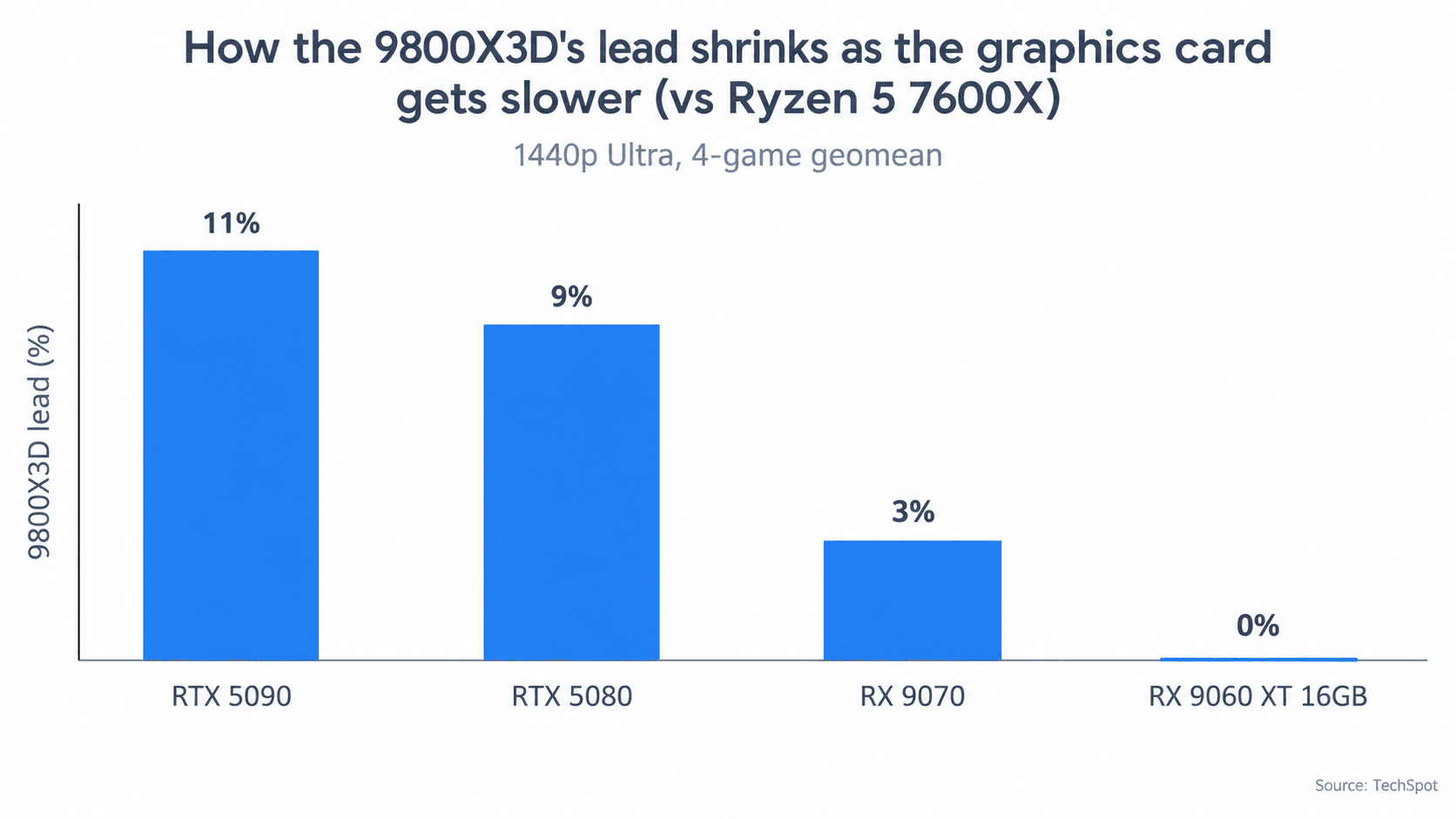
Most readers don't own an RTX 5090. The 20% figure above is what the 9800X3D does when the graphics card is no obstacle, and most of us have a card that is an obstacle. So how much of that lead survives on a normal GPU?
No outlet has measured the 270K Plus against the 9800X3D across several graphics cards, so I can't give you that number, and I won't invent one. What does exist is TechSpot's scaling test, which ran the 9800X3D against a Ryzen 5 7600X on four graphics cards (4-game geomean, Ultra preset). It shows the shape of the effect.
| 9800X3D lead over a Ryzen 5 7600X | RTX 5090 | RTX 5080 | RX 9070 | RX 9060 XT 16GB |
|---|---|---|---|---|
| 1080p Ultra | 26% | 10% | 8% | 0% |
| 1440p Ultra | 11% | 9% | 3% | 0% |
| 4K Ultra | 8% | 0% | 0% | 0% |
This is not a 270K Plus test. The 7600X is a much slower CPU than the 270K Plus, so this table shows how the 9800X3D's lead shrinks over a weak chip as the graphics card gets slower. It's there to show the pattern, not to predict a 270K Plus result.
Because the 270K Plus is a far stronger chip than the 7600X, its real gap to the 9800X3D on a mid-range card is likely as small or smaller than these figures. My reading: on an RTX 5070 or RX 9070 class card at 1440p, the two will feel very close in most single-player games.
Two caveats keep that from being a blank check. First, upscaling brings CPU differences back. At 1440p, Quality mode renders at about 960p internally, so the graphics card is working at a lower resolution and the CPU becomes the limit again; TechSpot makes this point in its piece on CPU benchmarking. Second, competitive shooters and simulation games stay CPU-limited far longer than story games do.
The practical rule: with an RTX 5080 or RX 9070 XT class card or faster, or if you play esports at high refresh rates, the 9800X3D's lead matters. With an RTX 5070 or RX 9070 class card at 1440p native in story-driven games, it mostly doesn't.
5. Productivity: Where the 270K Plus Runs Away
Games are the 9800X3D's home turf. Everything that splits a job into many pieces is the 270K Plus's. It has 24 cores (8 performance and 16 efficiency, 24 threads) and 36MB of L3 cache against the 9800X3D's 8 cores, 16 threads and 96MB of 3D V-Cache. Here's what Club386 measured in March 2026.
| Workload (Club386) | Core Ultra 7 270K Plus | Ryzen 7 9800X3D | Winner |
|---|---|---|---|
| Cinebench 2026 multi-core | 9,896 | 5,505 | Intel +80% |
| Cinebench 2026 single-core | 580 | 531 | Intel +9% |
| Corona 10 render | — | — | Intel +70% |
| 7-Zip compression (MIPS) | 198,463 | 128,790 | Intel +54% |
| Y-Cruncher 5B | 101.3s | 118.7s | Intel 15% faster |
| PugetBench Premiere Pro | — | — | Intel +8% |
| PugetBench Photoshop | — | — | 9800X3D +18% |
The pattern is simple. Renders, code builds and file compression hand every core its own chunk of work, so having three times as many cores finishes them far sooner: +80% in Cinebench multi-core, +70% in Corona, +54% in 7-Zip. Work that leans on one or two fast cores, like Photoshop, goes to the 9800X3D, and Premiere Pro, which sits in between, gives Intel only +8%.
Who this matters for: streamers who encode on the CPU, video editors, programmers who compile large projects, and 3D artists. If your week includes watching a progress bar in one of those apps, the 270K Plus gives you time back. If you mostly game and edit photos, the 80% is a number on a chart, and the 9800X3D is the better fit.
6. The Upgrade Path: AM5's Future vs LGA1851's Dead End
This is the part of the decision benchmarks can't show you, and it's why I'd think hard before picking purely on price.
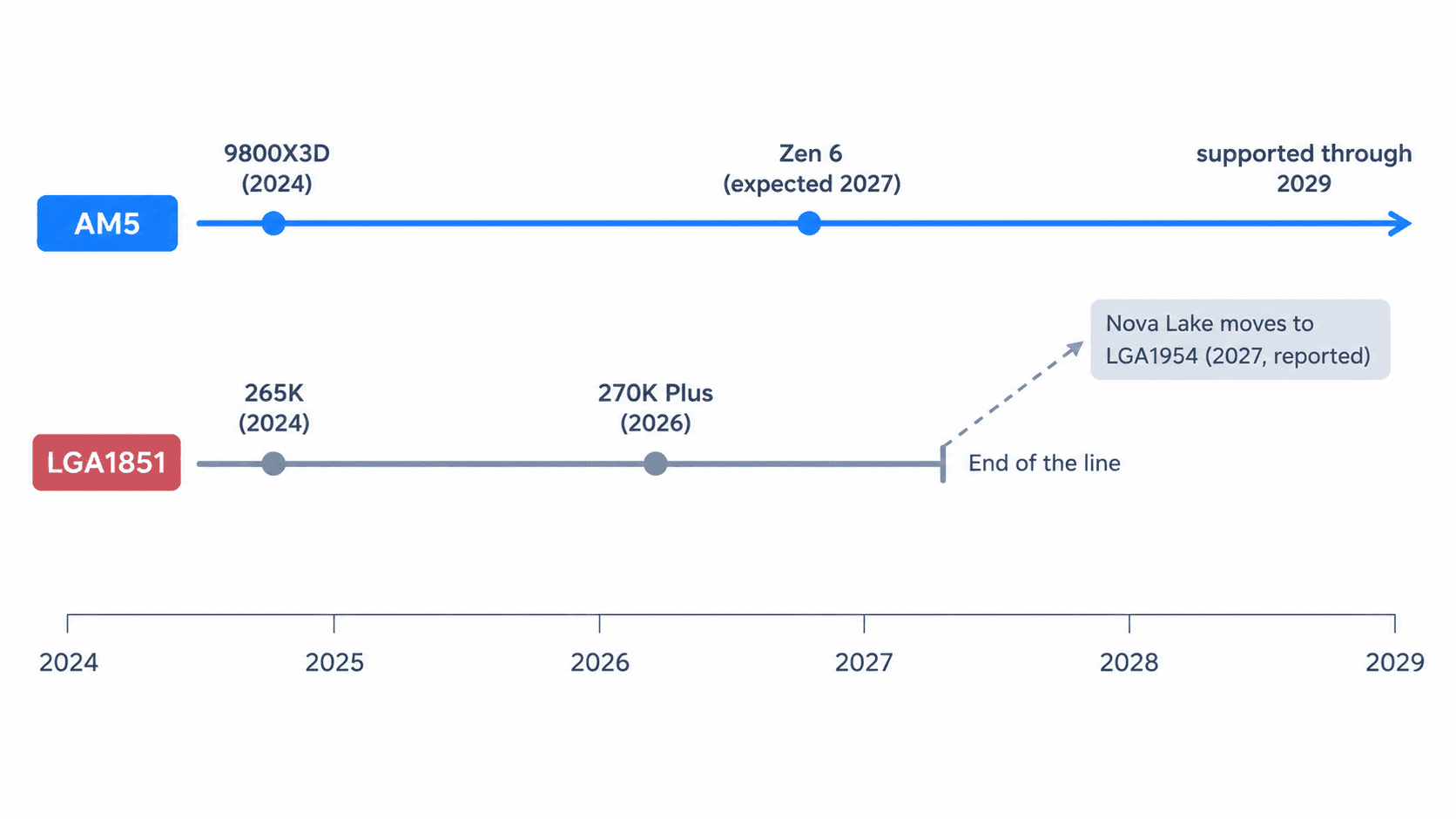
AM5 is the safe side. AMD confirmed at Computex 2026 that AM5 is supported through 2029. Zen 6 desktop (code-named Olympic Ridge, likely Ryzen 10000) is listed for AM5 in AMD's own developer documentation as of August 27. The expected timeline is a reveal at CES 2027 and retail in early-to-mid 2027, though that timing is unofficial. Existing AM5 boards should only need a BIOS update.
LGA1851 is the other story. Intel's Nova Lake-S (Core Ultra 400) reportedly uses a new LGA1954 socket with new 900-series chipsets, and a leaked roadmap puts the first desktop chip in Q1 2027. That's a leak, not an announcement. But Tom's Hardware, TechSpot, GamersNexus and Club386 all describe LGA1851 as a dead end, so I'm treating it as the working assumption. The 270K Plus is effectively the last good chip this socket will get.
Here's what that costs in practice. Say it's 2029 and you want a faster CPU. On a 9800X3D system, you buy the CPU, update the BIOS, and you're done. On a 270K Plus system, you buy the CPU and a new motherboard. Using the 2026 board prices from section 2 as the yardstick (a B860 board at about $161, up to a Z890 board like the MSI MAG Z890 Tomahawk WiFi at about $230), that's roughly $160–230 extra at your next upgrade, which is at least what you saved by buying Intel in the first place.
There's a second, quieter cost. AM5 boards should hold their value better while the socket is alive, per the tech-insider piece, which matters if you ever sell the board separately.
Who doesn't care? Anyone who keeps a CPU for five years or more and replaces the whole PC when it's time. For that buyer, the dead end costs nothing, because the board would be retired with the CPU anyway. If that's you, ignore this section and buy on price and workload.
7. Power, Heat and Cooling
Intel's chip is rated 125W base and 250W maximum turbo; the 9800X3D is rated 120W. In Club386's testing, whole-system power ranged from 98–362W with the 270K Plus against 132–262W with the 9800X3D, so Intel's peak was about 38% higher. Under a full Cinebench multi-core load on a 420mm AIO, the 270K Plus peaked at 57°C and the 9800X3D at 48°C, a 9°C difference.
In games the gap is smaller. GamersNexus measured 125–140W at the wall and about 90–100W at the CPU package in F1 25. But efficiency is still Intel's weak spot: TechSpot found the 270K Plus used 35–58% more power than a Ryzen 7 9700X in games for 10–17% more fps. You pay for each extra frame in watts.
Budget your cooler accordingly. The 270K Plus wants a dual-tower air cooler or a 360mm AIO; the 9800X3D is fine on a 240mm AIO. That cooler difference is why the price gap in section 2 is slightly smaller in practice.
Two known issues, briefly. On the Intel side, Club386 saw PCIe Gen 5 SSDs lose up to about 2,800MB/s of throughput in synthetic tests on this platform, which didn't happen on the 9800X3D system. It only matters if you bought a Gen 5 drive specifically for its top speed. On the AMD side, there were 2025 reports of burned 9800X3D chips on some ASRock X870E boards; ASRock pointed to socket debris or user error and shipped a BIOS fix (v3.20), so keep your board's BIOS updated.
8. Who Should Buy the Ryzen 7 9800X3D
Buy it if you mainly game, especially competitive shooters, sims or strategy games, which are the titles where its lead was biggest. Buy it if you have, or plan to buy, an RTX 5080 or RX 9070 XT class card or faster, or you play at high refresh rates, because that's where section 4 says the CPU gap survives. Buy it if you want to drop a Zen 6 chip into the same board later. And buy it if you can catch it near the $411–429 it hit earlier this month, which trims the gap a little.
Who it's wrong for: anyone whose week is mostly rendering, compiling or exporting video, where 8 cores will feel slow next to 24. If you've already settled on AM5 and are wondering about AMD's pricier chip, our 9800X3D vs 9950X3D comparison covers it. My opinion: for a gaming-first PC, this is the chip, and the socket alone is worth the premium.
9. Who Should Buy the Core Ultra 7 270K Plus (and What About the 265K?)
Buy it if you game at 1440p on an RTX 5070 or RX 9070 class card and also do heavy CPU work. Buy it if you keep CPUs a long time and replace the whole PC when you upgrade, since the dead-end socket costs you nothing then. And buy it if you want the most multi-core performance for the money: 24 cores for $293, and about $200 at Micro Center when it has a deal, is hard to beat.
Who it's wrong for: anyone planning to swap in a faster chip in two or three years, and anyone gaming on a high-end card or at high refresh rates. If DDR5 prices are what's pushing you toward Intel at all, look at the DDR4 options on both sides before committing.
What about the 265K? It has 8 performance cores plus 12 efficiency cores (20 threads) and 30MB of L3 on the same LGA1851 socket. The 270K Plus is about 10% faster in games, and has four more cores, yet a new 265K costs $350 on PCPartPicker, more than the faster $293 270K Plus. Skip it. Only a used 265K, from around $235, undercuts the 270K Plus.
10. The Verdict
Buy the Ryzen 7 9800X3D if gaming is your main job for this PC and you'd like to drop in a faster CPU in two or three years. It's about 20% faster in CPU-heavy games and its AM5 socket is confirmed through 2029. Buy the Core Ultra 7 270K Plus if you game at 1440p on a mid-range card and also render, compile or edit video. You'll barely feel the gaming gap, you get up to 80% more multi-core performance, and you save about $150–160, as long as you accept that your next CPU upgrade means a new motherboard too.
My call: for a gaming-first build, I'd still pay the extra for the 9800X3D, because the socket alone is worth it. For a do-everything PC on a mid-range card, the 270K Plus is the better deal, and it's not close in multi-core work.
Frequently Asked Questions
Is the Core Ultra 7 270K Plus good for gaming?
Yes. It's Intel's fastest gaming chip of this generation, about 10% faster than the 265K and roughly on par with a Core i9-14900K in TechSpot's testing. It's still about 20% behind the 9800X3D at 1080p with an RTX 5090, per Tom's Hardware. On a mid-range card at 1440p, that gap mostly disappears because the graphics card becomes the limit.
Will Intel's next CPUs work on my Z890 or B860 motherboard?
Almost certainly not. Leaked roadmaps show Nova Lake (Core Ultra 400) moving to a new LGA1954 socket with new 900-series motherboards, with the first desktop chip expected in Q1 2027. Intel hasn't confirmed this officially, but every major outlet treats LGA1851 as a dead end. Buy a 270K Plus expecting to change the motherboard at your next CPU upgrade.
Can I put a Zen 6 CPU in my AM5 motherboard?
That's the plan. AMD has confirmed AM5 support through 2029, and AMD's own developer documentation lists Zen 6 desktop chips for AM5. They're expected in early-to-mid 2027. You should only need a BIOS update, not a new board.
Is the Core Ultra 7 265K still worth buying in 2026?
No, skip it. A new 265K costs $350, more than the faster $293 270K Plus, which replaced it in March 2026, runs about 10% faster in games and adds four more cores. Only a used 265K, from around $235, undercuts the 270K Plus. Both use the same LGA1851 socket, so the 265K has the same dead-end upgrade path.
Do I need expensive DDR5-7200 or CUDIMM memory for the 270K Plus?
No. Reviewers often test it with very fast DDR5-8200, but TechSpot found that dropping to standard DDR5-6000 costs only about 1–5% in games. With 32GB of DDR5-6000 already at $449, buy the regular kit.
Should I wait for Zen 6 or Nova Lake instead?
Both are expected in early 2027, and RAM prices are high right now, so waiting a few months is reasonable if your current PC still works. If you need a PC now, the 9800X3D is the safer buy because Zen 6 will drop into the same board later.
What to Read Next
- Ryzen 7 9800X3D vs Ryzen 9 9950X3D → If you've settled on AM5, whether the 9950X3D is worth the extra money over the 9800X3D.
- CPU Upgrade Guide → How to confirm your CPU is actually the bottleneck before you spend money on either chip.
- 2026 RAM Shortage: Upgrade Now or Wait? → Why 32GB of DDR5 costs $449 right now, and whether to buy RAM now or wait.
- Intel DDR4 CPU vs AM4 in 2026 → If DDR5 prices are the deal-breaker, the cheaper DDR4 options on both sides.