RTX 5070 Ti vs RX 9070 XTWhich Should You Upgrade To in 2026?
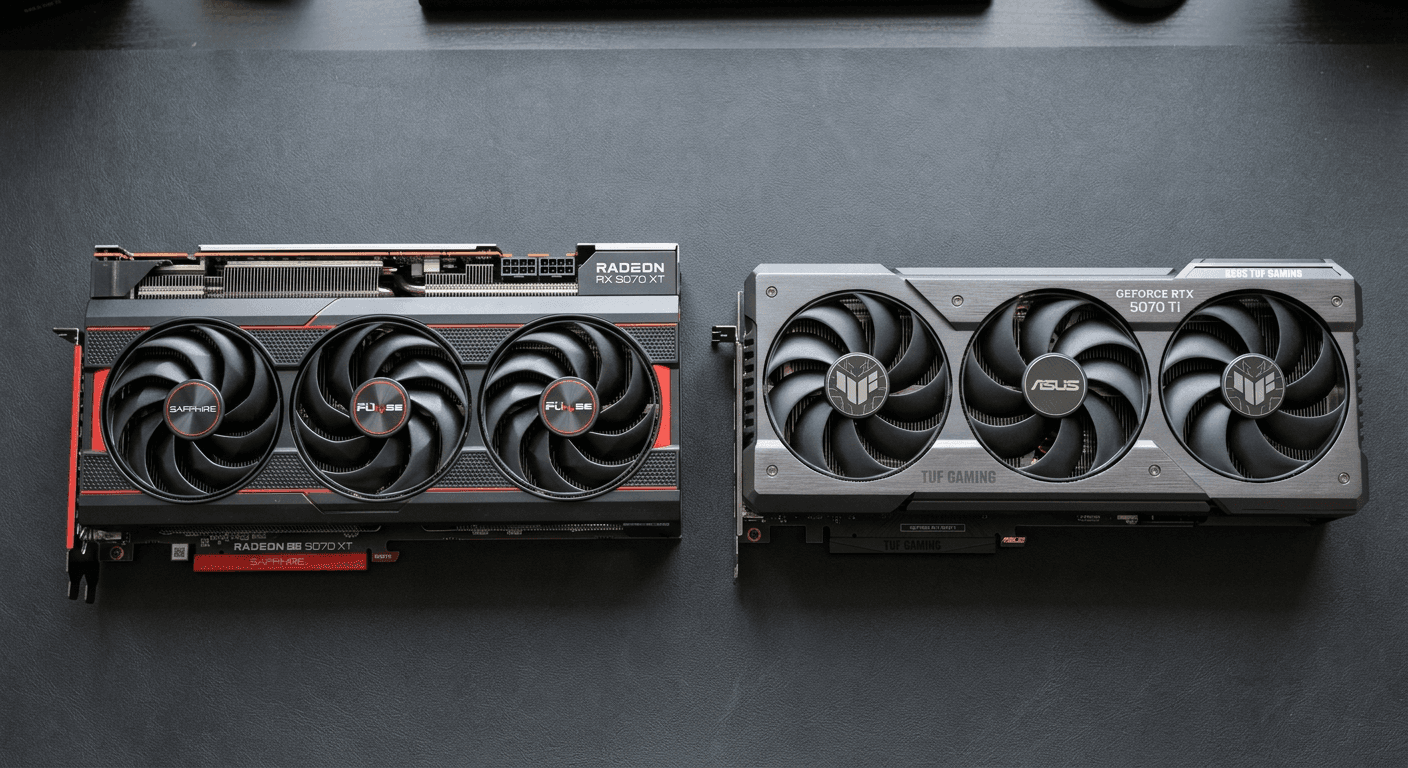
I've watched people spend $300 extra on the RTX 5070 Ti and then never once turn on ray tracing. They're paying for a capability they don't use because the marketing made it sound like the decisive factor — and the marketing isn't wrong, exactly, but it's incomplete. This article is the part the spec sheets leave out: what the price gap actually buys you, which of these cards is faster right now, and the specific situations where each one makes sense.
Both launched in early 2025. Both carry 16GB GDDR on a 256-bit bus. Both draw around 300W. On paper, the specs look close enough that the $150 MSRP gap seems like a reasonable ask for NVIDIA's ecosystem advantages. But nobody is paying MSRP in May 2026, and the actual performance story — especially after several rounds of driver updates — is more interesting than either company's marketing suggests.
What This Guide Covers
- The 30-Second Verdict
- Price Reality Check
- Rasterization Benchmarks — Who's Actually Faster
- Ray Tracing — Where NVIDIA Actually Pulls Away
- DLSS 4 vs FSR 4 — The Upscaling Gap Is Smaller Than You Think
- Power, Connectors, and PSU Compatibility
- Who Should Buy the RTX 5070 Ti
- Who Should Buy the RX 9070 XT
- The Verdict
1. The 30-Second Verdict
For most 1440p gamers, the RX 9070 XT is the right call. With AMD's Adrenalin 25.6.3 drivers, the 9070 XT now averages 3% ahead of the RTX 5070 Ti across 16 games at 1440p, according to NotebookCheck's driver update report. The street price gap between the two cards is $270–$310 in May 2026 — not the $150 MSRP difference you'll see cited in most articles. The RTX 5070 Ti earns its price premium for exactly one group: gamers who play Cyberpunk 2077, Alan Wake 2, Black Myth: Wukong, or similar titles with heavy ray tracing actually turned on. If that's not you, you're paying $270–$310 more for a performance difference you won't feel.
Buy the RTX 5070 Ti if you run heavy ray tracing in your actual game library, have a modern ATX 3.x PSU for the 16-pin connector, and are already invested in NVIDIA's ecosystem. Buy the RX 9070 XT if you game without RT cranked — competitive games, most RPGs, most AAA titles at standard settings — and want the best rasterization per dollar at 1440p.
2. Price Reality Check
The MSRP framing that most comparison articles use — "$150 difference, NVIDIA asks a modest premium" — stopped reflecting retail reality on launch day. In May 2026, the RTX 5070 Ti sits at approximately $979 on Amazon and from $979 on Newegg, against an MSRP of $749. The RX 9070 XT runs at approximately $669 on Amazon, against an MSRP of $599, with Newegg flash sales dropping to $530 for specific models — Neowin reported the PowerColor Reaper at that price on May 25, 2026. At MSRP, the gap is $150. At street pricing, that becomes $270–$310 depending on timing and retailer.
I couldn't find an RTX 5070 Ti below $900 on Newegg in the week this went up. The 9070 XT, meanwhile, has been available at $530 during flash sales — that's a $449 swing at the extremes. The "$300 gap" shorthand I use throughout this article is a floor, not a ceiling.
This matters because every benchmark comparison you read is probably measuring a $150 premium, but you're being asked to pay $270–$310. That changes the value calculation substantially. A 5% performance advantage at 1440p does not justify $300 in a vacuum — it might justify $150. The math is different depending on which number you have in your head when you're making the decision.
3. Rasterization Benchmarks — Who's Actually Faster
At launch in early 2025, the story looked like a clear NVIDIA win. TechSpot's original 55-game benchmark found the 9070 XT trailing the 5070 Ti by roughly 5% at 1440p and 4K. GamersNexus found similar margins — the cards trading blows within 6% across most titles. For a $150 MSRP gap, that was a defensible performance advantage.
Then AMD updated its drivers. NotebookCheck's testing after the Adrenalin 25.6.3 release found the RX 9070 XT now averaging 3% faster than the RTX 5070 Ti across 16 games at 1440p. AMD gained 9% from its launch performance to current drivers. NVIDIA gained 2.5% over the same period. That's not a typo — AMD has closed the gap and, in current driver form, edged ahead in average rasterization.
TechSpot's updated 52-game benchmark from May 2026 shows the divergence by title: F1 25 rasterization runs 7% faster on the 9070 XT at 1440p. Call of Duty is 62% faster on AMD at 4K Basic, and 19–28% faster with RT and upscaling enabled. Cyberpunk 2077 rasterization gives AMD a slight edge. Crimson Desert goes the other way — NVIDIA leads by 9–14% there. This is what a genuine title-by-title split looks like, and it's why average-across-games numbers are the only reliable signal.
What this means practically: rasterization in May 2026 is a wash. The margin across a broad game library sits at 3–5% either direction, imperceptible without a frame counter. You are not buying a faster rasterization card when you buy the 5070 Ti at its current street price. You are buying NVIDIA's ecosystem — and the ray tracing performance covered in the next section.
4. Ray Tracing — Where NVIDIA Actually Pulls Away
AMD's ray tracing disadvantage is real, and softening it would cost you money. In heavy ray-traced titles, the RTX 5070 Ti leads the RX 9070 XT by margins ranging from meaningful to enormous depending on the game and how the developer implemented RT.
GamersNexus's testing of Black Myth: Wukong at 4K with ray tracing puts the 5070 Ti ahead by 78%. That is not a close race — that is a categorically different experience. Resident Evil 4 at 4K RT lands at near-parity, demonstrating that AMD's RT disadvantage is implementation-specific, not universal. Lighter RT is where AMD competes; heavier implementations built on complex BVH traversal are where it struggles.
At 1440p, the numbers from BottleneckPC tell the same story: Cyberpunk 2077 with all-RT enabled (no path tracing) runs at roughly 70 FPS on the 5070 Ti versus 52 FPS on the 9070 XT. Alan Wake 2 with high ray tracing goes 75 FPS versus 58 FPS. Then there's path tracing in Cyberpunk at 1440p native: the 5070 Ti lands around 35 FPS; the 9070 XT lands around 22 FPS according to Technerdo's testing. That's a 59% NVIDIA advantage, and a 13-frame difference that separates playable from choppy before you reach for an upscaler.
TechSpot's May 2026 52-game benchmark adds the nuance: F1 25 with RT at 1440p shows the 5070 Ti leading by 20–24%. Cyberpunk RT gives NVIDIA a 15% edge at 1440p. Call of Duty RT is the exception — AMD leads by 19–28% there, confirming that AMD's RT story is not uniformly bad, just title-dependent in ways that closely track implementation complexity.
The honest framing for this section is a single question: do you actually play the heavy-RT titles with RT enabled? If you're running Cyberpunk with RT Overdrive or Alan Wake 2 with ray tracing cranked — not as a tech demo, but as your regular way of playing these games — the 5070 Ti's performance lead is real and will matter every session. If you're playing competitive shooters, most RPGs, or open-world games without RT on, you will never encounter this advantage.
5. DLSS 4 vs FSR 4 — The Upscaling Gap Is Smaller Than You Think
DLSS is one of the most reliably overstated talking points in GPU marketing. It's excellent technology — I don't want to undersell it — but the argument that DLSS is decisive for most users hasn't held up as AMD's upscaling has matured.
The RTX 5070 Ti runs DLSS 4, built on a transformer AI model and capable of Multi Frame Generation — up to four total frames for every rendered frame, with three AI-generated frames inserted between each. A 6,747-voter blind test run by ComputerBase found that DLSS 4.5 was preferred over native rendering by nearly half the participants across six games. That's a remarkable result for an upscaler; it genuinely produces frames that measure favorably against some rendered frames at native resolution. Multi Frame Generation also compounds NVIDIA's RT advantage in path-traced titles — more total frames on top of a larger raw framerate lead.
The RX 9070 XT runs FSR 4, AMD's first ML-based upscaler and a meaningful departure from prior FSR generations, which were purely spatial scalers. TechSpot's FSR 4 review found Quality mode "comparable to DLSS Quality mode in most scenarios." That's a real thing to say about AMD's upscaling — six months ago it wouldn't have been accurate. FSR 4 is also open-source and works across more games than native DLSS 4 support, which is a practical advantage for anyone with a varied game library.
The gap still exists, and it matters most in path-traced games where DLSS MFG compounds NVIDIA's already-substantial RT performance advantage into a larger total frame output. For standard 1440p gaming without path tracing, FSR 4 Quality is close enough that most people won't notice a difference in a blind test. If you're buying the 5070 Ti primarily because of DLSS — without the ray tracing use case underneath it — the benchmark data doesn't fully support that $300 premium.
6. Power, Connectors, and PSU Compatibility
Both cards draw around 300W on paper. The actual story is more complicated for AMD, and worth knowing before you commit to either card.
The RTX 5070 Ti carries a 300W TDP rating and uses NVIDIA's 16-pin 12V-2×6 connector. An adapter is included in the box, so if your current PSU only has 8-pin connectors, you're not stranded — but you'll have a cable running through an adapter, which I'd treat as a temporary solution rather than a proper install. NVIDIA specifies a 750W PSU, which holds up in real testing at its rated draw. If you're already running a modern ATX 3.x PSU, the 16-pin connection is cleaner and the cable management is better.
The RX 9070 XT is rated at 304W TDP and uses two standard 8-pin connectors — no adapter, compatible with any modern PSU without extra hardware. That sounds like a simpler install, and the connector situation is simpler. The actual power draw is not what the TDP suggests, though. Testing by Ofzen and Computing found the 9070 XT averaging 351W in real gaming loads, with spikes reaching 417W. That's a material gap from the rated 304W, and it's why I'd put the PSU recommendation at 800–850W for the AMD card rather than the 800W AMD states in its spec sheet. A quality 750W unit puts you technically in spec, but with minimal headroom during those 417W transients — headroom that matters for system longevity.
Both cards use PCIe 5.0 but will seat and run in PCIe 4.0 and PCIe 3.0 slots with minimal performance loss — a few percent at most, and only at 4K with heavy texture loads. If you're running an older board, the slot generation is not a reason to skip either card. Check the GPU upgrade compatibility checklist if you haven't confirmed case clearance and PSU wattage for your specific build before ordering.
7. Who Should Buy the RTX 5070 Ti
The RTX 5070 Ti is a legitimate purchase. The buyers who get full value from its $979 street price are specific, but they exist — and if you're in this group, the $270–$310 premium is justified.
Buy it if you play Cyberpunk 2077 with ray tracing enabled — not just turned on in a menu, but actually on while you're running through the game. Same for Alan Wake 2, Black Myth: Wukong, and Indiana Jones with RT cranked. These titles expose the 15–78% RT performance advantage that justifies the street price gap. If ray tracing is part of how you actually experience these games — not a feature you toggle for screenshots and then disable — the 5070 Ti is the correct call.
Buy it if you're already embedded in NVIDIA's ecosystem in a meaningful way: a G-Sync monitor, a game library with heavy DLSS support, NVENC for streaming or content recording. DLSS 4 Multi Frame Generation has no AMD equivalent, and NVENC produces better streaming quality and lower latency than AMD's encoder at equivalent bitrates. These advantages stack on top of the RT lead.
Buy it if driver stability is a priority. NVIDIA's early 572.xx drivers caused crashes across the RTX line at launch — that was resolved with the 576.02 update in April 2026, and the 5070 Ti is currently stable. AMD's Adrenalin software still carries ongoing timeout and crash reports, with the workaround being Driver Only installation without the Adrenalin suite. NVIDIA's long-term driver track record at this price tier is cleaner.
Don't buy the 5070 Ti to future-proof against ray tracing you haven't played in RT form yet. The DLSS and RT advantage is real, but it's only real if you actually enable it. Paying $979 for features you plan to explore someday is a different calculation than paying for features you use every session.
8. Who Should Buy the RX 9070 XT
The RX 9070 XT is the better buy for most people shopping in this price range in May 2026. "Most people" means gamers whose library runs primarily competitive multiplayer, RPGs, open-world games, and AAA titles at standard settings without heavy RT — which describes the majority of 1440p gaming hours. In those games, with Adrenalin 25.6.3 drivers, the 9070 XT matches or edges out the RTX 5070 Ti in rasterization, per NotebookCheck and TechSpot's updated May 2026 benchmarks. You are getting equal or better rasterization performance for $270–$310 less.
That $270–$310 has real places to go. A 2TB NVMe SSD. A 32GB DDR5 RAM kit. A CPU upgrade, if gaming performance in your specific titles is actually bottlenecked by the processor rather than the GPU. Building around the 9070 XT and routing the savings into a RAM or CPU upgrade can improve your day-to-day experience more than paying for GPU headroom you never access.
The RX 9070 XT also slots into any modern PSU with two 8-pin connectors without an adapter. If you're upgrading from a card from the 2020–2023 era, you almost certainly have two idle 8-pin cables in your PSU's cable set. Drop-in replacement, no extra hardware. The 5070 Ti requires the 16-pin adapter if your PSU predates ATX 3.x, and while the adapter works, it's an extra step and cable management compromise that shouldn't be necessary.
FSR 4 is good enough for standard 1440p gaming. TechSpot found it comparable to DLSS Quality mode in most scenarios, which means if you're not doing path-traced Cyberpunk, the upscaling gap is not something you'll notice in actual play.
The honest caveat: AMD's Adrenalin software has ongoing driver issues as of May 2026. The workaround — install Driver Only without the full Adrenalin suite — works, but it's an extra step that shouldn't be necessary at this price tier. If you want to install the card and never think about drivers again, NVIDIA's current stability record is better. That caveat is real, and you should weigh it; it's just not worth $300 extra by itself.
9. The Verdict
With current drivers in May 2026, the RX 9070 XT is the better GPU for most 1440p gamers. It matches or beats the RTX 5070 Ti in rasterization, costs $270–$310 less at street pricing, and the money you save is real and immediately spendable on other parts of your build.
The RTX 5070 Ti is the right card for one specific scenario: you play Cyberpunk 2077, Alan Wake 2, Black Myth: Wukong, or Indiana Jones with ray tracing on — not as a curiosity, but as your standard way of playing those games. The 15–78% RT performance lead in heavy implementations is real, and DLSS 4 Multi Frame Generation compounds that advantage further in path-traced territory.
Don't buy the 5070 Ti on the theory that you'll use ray tracing more in the future. Buy it because you're using it now. If you're not, the 9070 XT gives you the same rasterization performance and puts $270–$310 back in your pocket.
Frequently Asked Questions
Is the RTX 5070 Ti worth $300 more than the RX 9070 XT?
At MSRP the gap is $150, but at street prices in May 2026 you're looking at $270–$310 more for the 5070 Ti. Whether that's worth it depends entirely on whether you play ray-traced games with RT actually on. In pure rasterization — which covers most games most people play — the 9070 XT matches or edges out the 5070 Ti with current drivers. If you're playing Cyberpunk with RT Overdrive or Alan Wake 2 with ray tracing on, the 5070 Ti is worth the premium. If you're not doing that, the $300 is better spent on other components.
Does the RX 9070 XT support DLSS?
No. DLSS is NVIDIA-exclusive. The RX 9070 XT uses FSR 4, AMD's first ML-based upscaler, which has closed the gap significantly versus prior generations. TechSpot's testing found FSR 4 Quality mode "comparable to DLSS Quality mode in most scenarios." The gap is narrower than it used to be, but DLSS 4's Multi Frame Generation — which can insert up to three AI-generated frames between every rendered frame — has no AMD equivalent, and that matters most in path-traced games.
Which card runs cooler and quieter?
On paper, both have 300–304W TDP ratings, but the RX 9070 XT averages around 351W in actual gaming loads, with spikes to 417W. The 5070 Ti is more consistent at its rated 300W. In practice, thermal behavior depends heavily on the specific AIB cooler you choose — a Sapphire Nitro+ or PowerColor Red Devil will run significantly quieter than a budget dual-fan model. Check cooler-specific reviews before choosing your AIB model.
Will the RTX 5070 Super replace the 5070 Ti?
As of May 2026, the RTX 5070 Super and 5070 Ti Super appear in PSU calculator leaks but have not been officially announced. The 5070 Ti Super is rumored to pack 24GB GDDR7. If you're close to a purchase decision, this rumor shouldn't make you wait indefinitely — Super refreshes typically land 12–18 months after the original lineup.
Which has better driver support long-term?
Both companies have shipped driver issues at launch. NVIDIA's early 572.xx drivers caused crashes across the RTX line; those were resolved with 576.02. AMD's RX 9070 XT has ongoing Adrenalin software timeout reports — the workaround is installing Driver Only without the Adrenalin suite. NVIDIA has the longer track record of stable long-term driver support at this tier, but AMD has been improving consistently and the current driver gap is smaller than its reputation suggests.
What to Read Next
- Should I Upgrade My GPU? The Pre-Purchase Checklist → If you've confirmed your GPU is the bottleneck and you're shopping in the $600–$1,000 range, this checklist covers PSU wattage, case clearance, slot compatibility, and the DDU driver cleanup process before you install either card.
- How to Upgrade Your PC for Gaming → If you're not sure GPU is even the right upgrade — or if CPU, RAM, or monitor resolution should come first — this walks through the full gaming upgrade priority by use case.
- PC Upgrade Buyer's Guide 2026 → If you want the full 2026 component tier picks beyond just this GPU decision — including CPU, RAM, and SSD recommendations at current street prices.
- RTX 5060 Ti vs RX 9060 XT: The Mid-Range Battle → If your budget sits below $500, this is the comparison that matters — including today's live street prices and the VRAM math behind the verdict.
- RX 9070 vs RTX 5070: the mid-tier version of this matchup → If the Ti/XT tier is more than you want to spend, this covers the step-down pairing most upgraders actually buy.
- Should You Buy a Used GPU Instead of New in 2026? → Both of these cards get cheaper fast once you look at the used market for their previous-gen equivalents — here's the math on when that trade is worth it.